Failovers
When a Namespace with High Availability is disrupted by an outage, Temporal Cloud can
fail over the Namespace from the primary to the replica. This lets in-flight Workflow Executions continue, new Workflow Executions start, and closed Workflow Executions be inspected, all with minimal interruptions or data loss.
Returning control from the replica to the primary is called a failback. After a Temporal-managed failover, Temporal automatically fails back to the original region once it is healthy. See Failbacks for details on automatic and manual failback options.
Automatic failover
Temporal Cloud offers managed outage detection and failover to all Namespaces that use High Availability. Temporal-managed failovers, also known as "automatic failovers," keep your Namespace available without manual intervention. Temporal aims to both detect the outage and complete a failover in minutes from when the outage began, according to the stated Recovery Time Objective (RTO).
After a Temporal-managed failover, the Namespace will have a replica in its original region. Once the original region is healthy again, Temporal Cloud automatically performs a failback, moving the Namespace back to its original region.
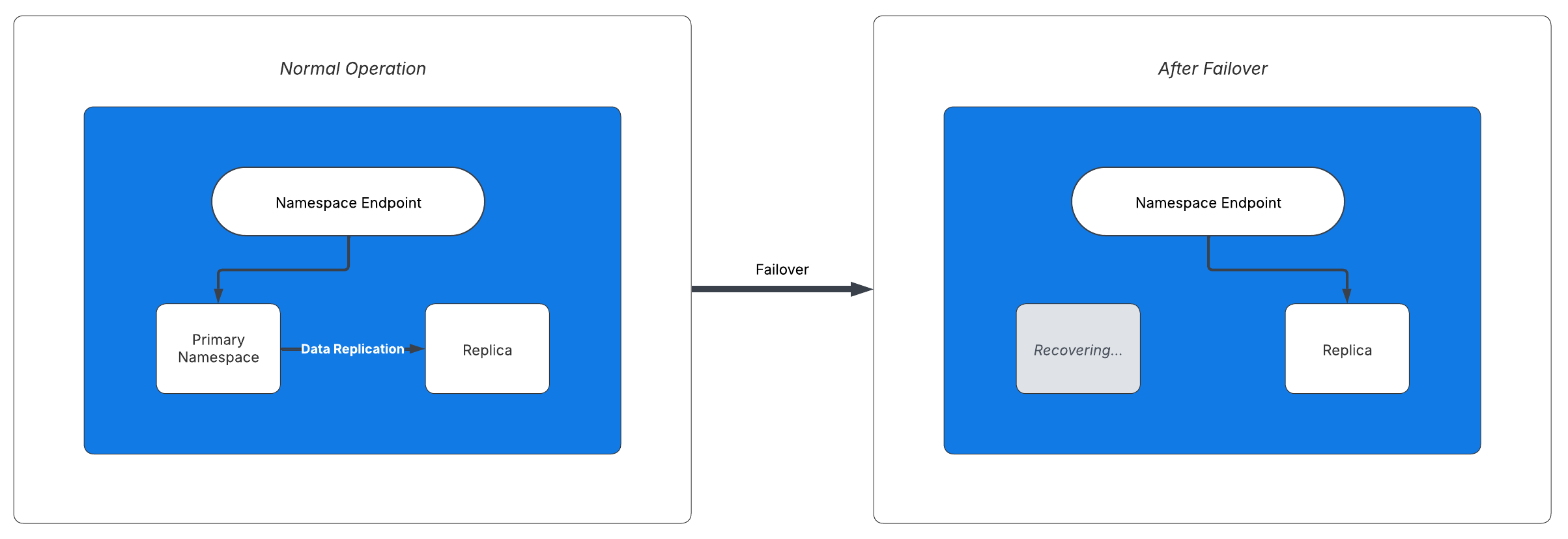
On failover, the replica becomes active and the Namespace endpoint directs access to it.
To opt out of Temporal-managed failovers and its RTO, you can disable automated failovers.
Conditions that trigger an automatic failover
While the failover operation itself usually completes in seconds, the bulk of the Recovery Time in an outage is spent detecting the disruption and deciding to trigger a failover. See The failover process for a detailed breakdown.
Temporal Cloud runs automated Workflows that detect outages and trigger failovers. These Workflows continuously monitor the health of Temporal Cloud in every region and every cell.
If any of the monitored conditions are failing for too long, Temporal Cloud automatically triggers a failover on any Namespaces with High Availability that have a healthy replica.
Temporal's on-call engineers may also trigger a failover at their discretion, for example, if they see early signs of a regional outage.
The following list gives a general idea of the conditions that trigger a Temporal-managed failover. This is not an exhaustive list, and it may change over time.
- Whether Temporal Cloud's services in the cell are reachable from the control plane.
- The average latency of inbound RPC calls (excluding long-polling APIs) to Temporal services in the cell.
- The percentage of inbound RPC calls that returned errors related to server health.
- The average latency of calls from Temporal Cloud's services in the cell to its persistence layer.
- The percentage of calls to the persistence layer that returned errors related to persistence health.
Manual failover
You can also manually trigger a failover based on your own monitoring or for failover testing.
Most Namespaces with High Availability are well-served by Temporal-managed failovers. The cases where a manual failover is warranted are:
- Testing failover or migrating to a new region. A manual failover is the standard way to exercise your failover process with your Clients and Workers, or to move a Namespace to a different region.
- An outage that affects only your systems. If an outage is contained to your application, Workers, or other infrastructure, and Temporal Cloud is not affected, Temporal will not initiate a failover on your behalf. Detect the outage with your own monitoring and trigger a failover yourself.
- Failing over more aggressively during a regional outage. Even with Temporal-managed failovers enabled, you can trigger a failover yourself if you detect a regional outage before Temporal does. Whichever failover happens first takes effect, and the later one is a no-op. A user-triggered failover does not conflict with Temporal's automatic failover.
The failover process
The failover process is the same whether it is triggered automatically by Temporal or manually by a user.
-
During normal operation, the primary asynchronously replicates data to the replica, keeping them in sync.
-
A failover is triggered. For automatic failovers, the majority of time is spent on outage detection. Temporal's automated health checks must confirm the disruption before initiating a failover. For the overall timing target, see the Recovery Time Objective (RTO).
-
The Namespace becomes active in the replica's region.
- Temporal Cloud first attempts a graceful failover: it pauses traffic, drains in-flight replication, and switches to the replica with no data conflicts.
- If the graceful attempt does not complete within 10 seconds, Temporal Cloud falls back to a forced failover, which immediately activates the replica. In a forced failover, any events not yet replicated undergo conflict resolution once the original region comes back.
- This hybrid strategy balances consistency and availability. During the switch, Workflow operations are briefly paused, and Temporal Cloud returns a retryable "Service unavailable" error to SDKs.
-
The Namespace Endpoint re-routes to the active region. This DNS change can take a few minutes to fully propagate to all Clients and Workers. If your application has an extremely demanding Recovery Time, you can eliminate this stage by connecting through a Regional Endpoint instead of the Namespace Endpoint.
-
Failback. If the failover was triggered by Temporal, Temporal automatically triggers a failback to the original region once the region is healthy. If the failover was triggered by a user, the Namespace continues as-is until a user triggers another failover. See failback options for details.
Split-brain scenario
At any time, only the primary or the replica should be active. However, if a network partition separates the two regions, the regions cannot communicate with each other. If you promote the replica to active during a network partition, both regions will be active simultaneously, accepting writes independently. This is known as a split-brain scenario.
When the network partition resolves and the regions can communicate again, Temporal's conflict resolution process reconciles the divergent histories and determines which region remains active.
Conflict resolution
Namespaces with replicas rely on asynchronous event replication. Updates made to the primary may not immediately be reflected in the replica due to replication lag, particularly during failovers. In the event of a non-graceful failover, replication lag may cause a temporary setback in Workflow progress.
Namespaces that are not replicated can be configured to provide at-most-once semantics for Activity execution when a retry policy's maximum attempts is set to 0. High Availability Namespaces provide at-least-once semantics for execution of Activities. Completed Activities may be re-dispatched in a newly active Namespace, leading to repeated executions.
When a Workflow Execution is updated in a newly active replica following a failover, events from the previously active Namespace that arrive after the failover cannot be directly applied. At this point, Temporal Cloud has forked the Event History.
After failover, Temporal Cloud creates a new branch history for execution and begins its
conflict resolution process. The Temporal Service ensures that Event Histories remain valid and are replayable by SDKs post-failover or after conflict resolution.